Backtrack 5: Penetration Testing with Social Engineering Toolkit
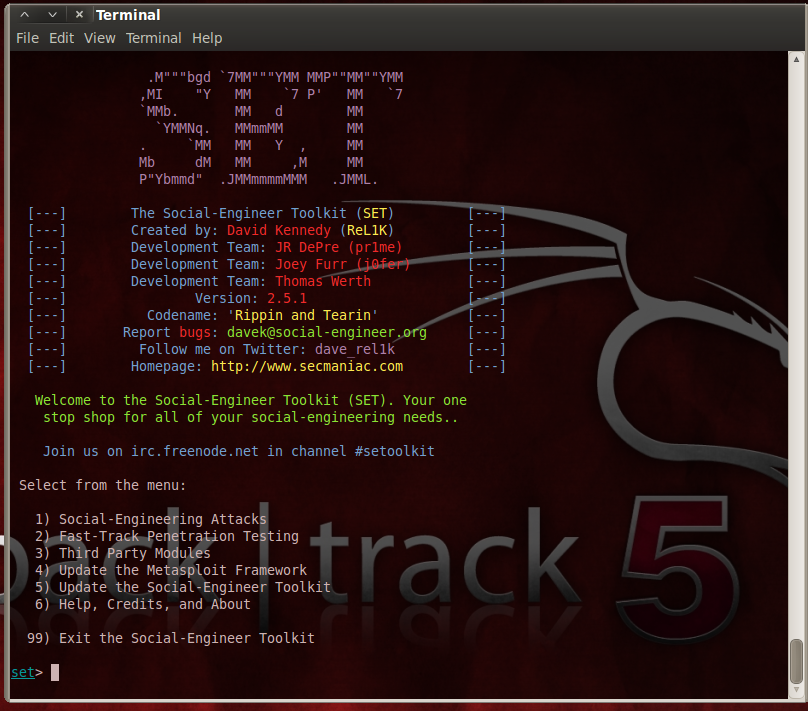
Social engineering attacks are one of the
top techniques used against networks today. Why spend days, weeks or
even months trying to penetrate layers of network security when you can
just trick a user into running a file that allows you full access to
their machine and bypasses anti-virus, firewalls and many intrusion
detection systems?
This is most commonly used in phishing
attacks today -craft an e-mail, or create a fake website that tricks
users into running a malicious file that creates a backdoor into their
system. But as a security expert, how could you test this against your
network? Would such an attack work, and how could you defend against it?
The Backtrack Linux penetration testing
platform includes one of the most popular social engineering attack
toolkits available. My previous “How-To” on Backtrack 4′s SET has been
extremely popular. Well, Backtrack 5′s SET includes a whole slew of new
features and I figured it was time to update the tutorial.
We will use SET to create a fake website that offers a backdoored program to any system that connects. So here goes…
Okay, timeout for a disclaimer: This is
for security testing purposes only, never attempt to use any security
checks or tools on a network that you do not have the authorization and
written permission to do so. Doing so could cost you your job and you
could end up in jail.
1. Obtain Backtrack 5 release 1. You can use the LiveCD version, install it on a new system or run it in a Virtual Machine.
2. The first thing you will want to do is
update both the Metasploit Framework and the Social Engineering Toolkit
to make sure you have the latest version. Update both, restart SET and
check updates one more time.
3. Select number 1, “Social Engineering Attacks”
4. Next select 2, “Website Attack Vectors”. Notice the other options available.
5. Then 1, “Java Applet Attack Method”. This will create a Java app that has a backdoor shell in it.
6. Next choose 1, “Web Templates” to have
SET create a generic webpage to use. Option 2, “Site Cloner” allows SET
to use an existing webpage as a template for the attack webpage.
7. Now choose 1, “Java Required”. Notice the other social media options available.
8. Pick a payload you want delivered, I
usually choose 2, “Windows Reverse_TCP Meterpreter”, but you have
several to choose from including your own program . Number 13,
“ShellCodeExec Alphanum Shellcode” is interesting as it runs from
memory, never touching the hard drive, thus effectively by-passing most
anti-virus programs.
9. Next choose an encoding type to bypass
anti-virus. “Shikata_ga_nai” is very popular, Multi-Encoder uses
reveral encoders, but number 16 is best, “Backdoored Executable”. It
adds the backdoor program to a legitimate program, like Calc.exe.
10. Set the port to listen on, I just took the default.
Now Backtrack is all set and does several
things. It creates the backdoor program, encodes and packs it. Creates
the website that you want to use and starts up a listening service
looking for people to connect. When done, your screen will look like
this:

Okay we are all set. Now if we go to a “Victim” machine and surf to the IP address of the “attacker” machine we will see this:

If the “Victim” allows this Java script to run, we get a remote session on our attacking machine:

You now have access to the victims PC.
Use “Sessions -i” and the Session number to connect to the session. Once
connected, you can use linux commands to browse the remote PC, or
running “shell” will give you a remote windows command shell.

That’s it, one bad choice on the victim’s
side and security updates and anti-virus means nothing. The “Victim” in
this case was a fully updated Windows XP Professional with the top name
anti-virus internet security suite installed and updated.
They can even surf away or close the
webpage, because once the shell has connected the web browser is no
longer needed. Most attackers will then solidify their hold on the PC
and merge the session into another process effectively making the shell
disappear.
This is why informing your users about
the dangers of clicking on unknown links in e-mails, suspicious web
links, online anti-virus messages and video codec updates is critical.
It can be very hazardous to your network.
The easiest way to stop this type of
attack is to simply run the FireFox add-in “Noscript”, also BitDefender
AV 2012 seems very, very resilient against these types of attacks.
THANKS FOR : CYBER ARMS


Komentar
Posting Komentar